
A trip can look affordable and still leave you short of cash. The usual mistake is mixing three different numbers: what the trip costs, what you have already paid, and what you still need to pay.
This spreadsheet keeps those numbers separate. It also asks how each item is charged: per person, per night, per booking or per journey. That matters because a transfer quoted per person and a taxi quoted per vehicle cannot be compared by their headline prices alone.
Get the Travel Budget Spreadsheet
An editable trip-cost workbook for travellers comparing planned cost, prepaid items and cash still needed.
Direct file download. No account, timer or ad interaction required.
- Format and size
- XLSX — 17,505 bytes
- Version
- 1.0
- Requirements
- An XLSX-compatible spreadsheet app. No macros, account or internet connection is required after download.
- Source and reuse
- Original PrismGist workbook with a fictional example. No external price feed or third-party dataset. No separate reuse license is asserted.
How to use it
Save a copy, choose one currency, enter each price and charged quantity, then mark prepaid items separately. Confirm missing quotes before relying on the remaining-cash total.
Related resources
Use it to build one trip budget in one chosen currency. The download contains an Instructions sheet, a blank Budget sheet and a fictional worked Example. It does not fetch prices, convert currencies or connect to your bank.
Start with the unit you are buying
For each expense, enter a unit price and the number of charged units.
Two travellers buying return train tickets may need four one-way fares. A room for three nights needs three room-nights, not six because two people share it. A checked bag may be charged separately for each flight.
Write the charging basis in the notes column before entering the quantity. This small step prevents a surprisingly expensive kind of arithmetic error: a perfectly correct formula using the wrong multiplier.
Enter zero only when an item is genuinely free or not needed. Leave an unconfirmed expense blank and keep it on your list of unresolved quotes. The workbook must not treat a missing price as a confirmed free service.
A worked four-day trip
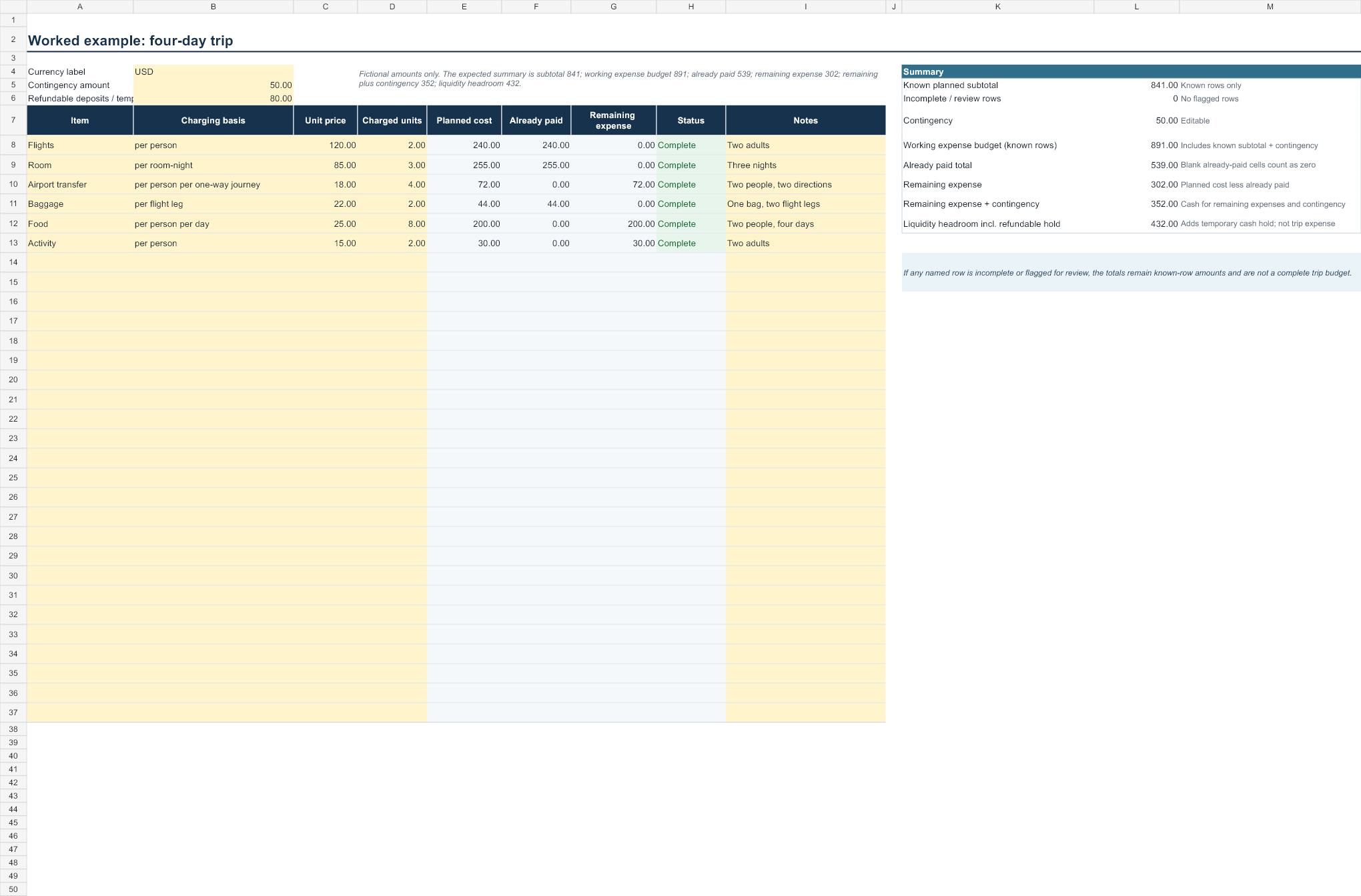
Consider two adults travelling for four days and staying for three nights. These are invented amounts to demonstrate the method, not current market prices.
Flights cost 120 per person: 240. The room costs 85 per night for three nights: 255. Airport transport costs 18 per person in each direction: 72. One bag costs 22 on each of two flight legs: 44. Food is budgeted at 25 per person per day: 200. An activity costs 15 per person: 30.
The planned trip subtotal is 841. Adding a separately chosen contingency of 50 gives a working budget of 891.
Now suppose the flights, room and baggage have already been paid: 240 + 255 + 44 = 539.
The remaining planned expenses are 302. Keeping the 50 contingency available means preparing another 352, not another 891.
Prepayment changes when you need the money. It does not make the trip cheaper.
Do not count the same money twice
A prepaid hotel belongs in the total trip cost and in the prepaid column. It should not be added again as a new expense when you calculate remaining cash.
Similarly, a refundable deposit is not automatically a final trip expense. Keep deposits in a separate liquidity note: money that may temporarily be unavailable. If the example trip also requires an 80 deposit, that may raise the cash or credit headroom needed from 352 to 432, while the planned expense budget remains 891 unless the deposit is actually retained.
This workbook is a planning aid, not an accounting system. Refund timing, card holds and settlement currencies need checking with the provider.
Add uncertainty where it belongs
Do not bury uncertainty by inflating every row without explanation. Record which prices are confirmed and which are estimates, then choose a visible contingency amount.
There is no universal correct contingency percentage. A prepaid short trip and a flexible multi-stop journey have different unknowns. Use an amount you understand and can afford, rather than treating a template default as personalised financial advice.
If a major price is missing, the result should remain an incomplete budget. A contingency is not a substitute for checking the main transport or accommodation cost.
Use the workbook with a live decision
When comparing two flights, include baggage, seat requirements and airport transport before deciding that the lower airfare wins.
For London airport choices, use PrismGist’s London Airport Total Cost Calculator. For fare bundles within a supported airline, use the Flight Fare Decision Checker. Bring the selected option’s cost into this workbook; do not enter both options as expenses for the same trip.
Download and limitations
The XLSX contains editable input cells and formula cells. Save a copy before editing it and keep private booking references, payment details and passport numbers out of any version you share.
The file has no macros, live-price feed or external data connection. Its example is fictional. Check all real quotes and charging units yourself.
Does prepaid mean saved?
No. It means paid earlier. It remains part of the trip’s total cost.
Can I use several currencies?
Convert amounts into your chosen budgeting currency before entering them, recording your conversion assumption. The workbook does not perform FX conversion.
Why is a row marked incomplete?
A required amount or quantity has not been supplied. Confirm it or explicitly enter zero when appropriate; do not hide an unknown expense to improve the total.
[…] Travel Budget Spreadsheet separates total cost, prepayment and remaining cash. Enter the chosen connectivity package once, […]
[…] rate plan and include non-refundable plans. Do not assume every hourly booking is flexible. The Travel Budget Spreadsheet helps separate total cost, already-paid amounts and money still needed using your own […]
[…] the whole-party amount into the Travel Budget Spreadsheet. If your actual problem is a queue, read Fast Track vs Priority Boarding; a lounge is a different […]
[…] access and usable rest time. Keep the room’s total and prepaid amount separate in your travel budget. For separately booked flights, review the self-transfer decision; a flexible room does not protect […]
[…] before treating a cheaper flight as a cheaper trip. Record the confirmed luggage charges in the travel budget spreadsheet, keeping paid costs separate from money still […]
[…] seat fee covers a return trip. Record both the minimum acceptable total and preferred total in the Travel Budget Spreadsheet. If comparing fare bundles, use the Flight Fare Decision Checker with your own current quotes; it […]